Your AI day planner

Your work.
Your time.

Quill turns your tasks, meetings and priorities into a calm, realistic day — and never changes your calendar without your OK.

Free to start. Pro unlocks live AI, focus sessions and repeating work.

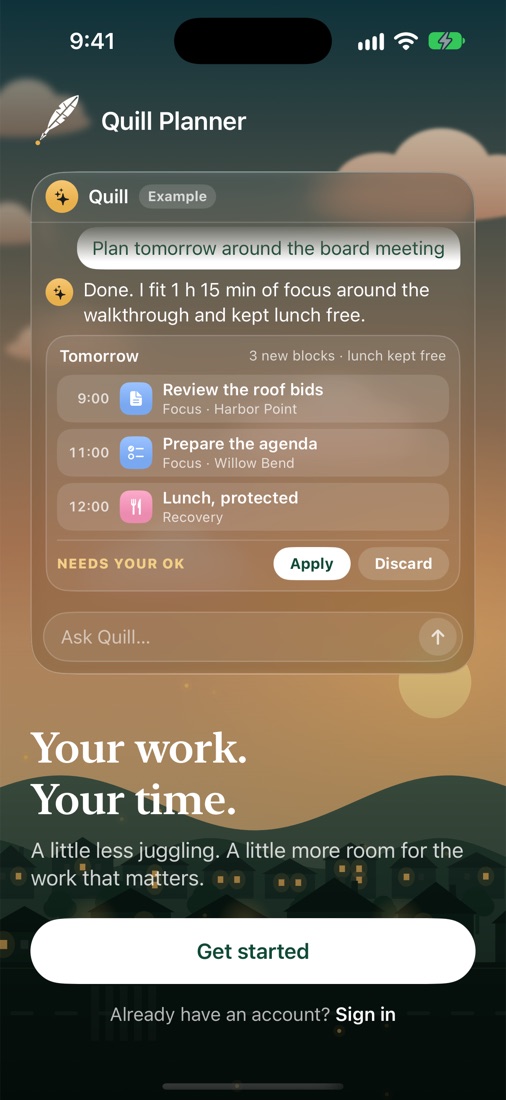
Quill planning tomorrow around a board meeting, with blocks waiting for approval

Why Quill

A planner that actually plans.

Most planners give you an empty calendar. Quill fills it with a day you can really get through.

✨

Ask Quill

“Plan my day”, “move lunch to 1 PM”, “push the board meeting back 30 minutes”. Quill previews every change; you tap Apply.

🗓️

Timebox your calendar

Day, timeline, hours and week views show meetings and focus blocks side by side, with icons that match what you’re doing.

📋

Agendas for your work

Quill drafts timed meeting agendas that fit your job — board meetings, client calls, lessons, stand-ups — and saves them to the meeting.

⏱️

Focus & Pomodoro

Start a focus session on any task. A running timer stays in sight everywhere in the app, and your time is recorded.

📥

Brain dump Inbox

Capture anything with Quick capture or Siri. Plan it onto a day when you’re ready — deadlines stay separate from planned days.

🔒

Private by design

Notebook pages, files and your device calendars stay on your iPhone. Some answers are written on-device with Apple Intelligence.
Planning

Tell Quill what matters. It finds the time.

Quill plans around your fixed commitments, protects lunch and leaves room for the unexpected. Every suggestion is a preview — nothing moves until you approve it, and Undo is always one tap away.

  • Plans your day or week around meetings
  • Moves, shifts and resizes blocks in plain English
  • Remembers how you like to work
Quill suggests a plan for tomorrow

Made for your kind of work

From HOA boards to classrooms to client work.

Tell Quill what you do and it shapes your workspace around it — the groups you work with, the meetings you run and the agendas you need.

Community managersProperty managersReal estateTeachers & studentsHealthcareSoftware teamsSalesFoundersConsultantsLegalTradesManagers
Quill sets up a workspace for a community manager

Pricing

Start free. Upgrade when Quill earns it.

Free

$0
  • Unlimited tasks and Inbox
  • Day, week and timeline planner
  • Quill planning and meeting agendas
  • Apple, Google and Outlook calendars on iPhone

Pro

$9.99/month
or $79.99/year Save 33%
  • Everything in Free
  • Live AI assistant
  • Focus timer and Pomodoro
  • Lists, labels, repeats and templates
  • Notes dictation and file attachments

HOA, nonprofit or student? Ask for 50% off any plan.

Questions

Good to know

Will Quill change my calendar on its own?

No. Quill shows every calendar change as a preview. Nothing moves until you tap Apply, and you can undo right away.

Does it work with Google and Outlook?

Yes. On iPhone, Quill plans around the Apple, Google and Outlook calendars you’ve added to your iPhone. Your calendar events stay on your device.

Is there a web version?

Yes. Sign in at app.quillplanner.com with the same account you use on iPhone and your workspace syncs automatically.

What happens to my data?

Your synced workspace is private to your account. When you use live AI, a short summary of your workspace is sent to OpenAI to write the reply. Read the Privacy Policy.

Is it only for HOA managers?

Quill started with community managers and works for any kind of work — teaching, healthcare, sales, software, trades, studying and more.

Plan your next day with Quill.

Quill Planner for iPhone is in beta. Request an invite, or start on the web today.